EXSYS EX-11099-2 Handleiding
EXSYS Netwerkkaart/adapter EX-11099-2
Bekijk gratis de handleiding van EXSYS EX-11099-2 (2 pagina’s), behorend tot de categorie Netwerkkaart/adapter. Deze gids werd als nuttig beoordeeld door 22 mensen en kreeg gemiddeld 4.2 sterren uit 5 reviews. Heb je een vraag over EXSYS EX-11099-2 of wil je andere gebruikers van dit product iets vragen? Stel een vraag
Pagina 1/2
65
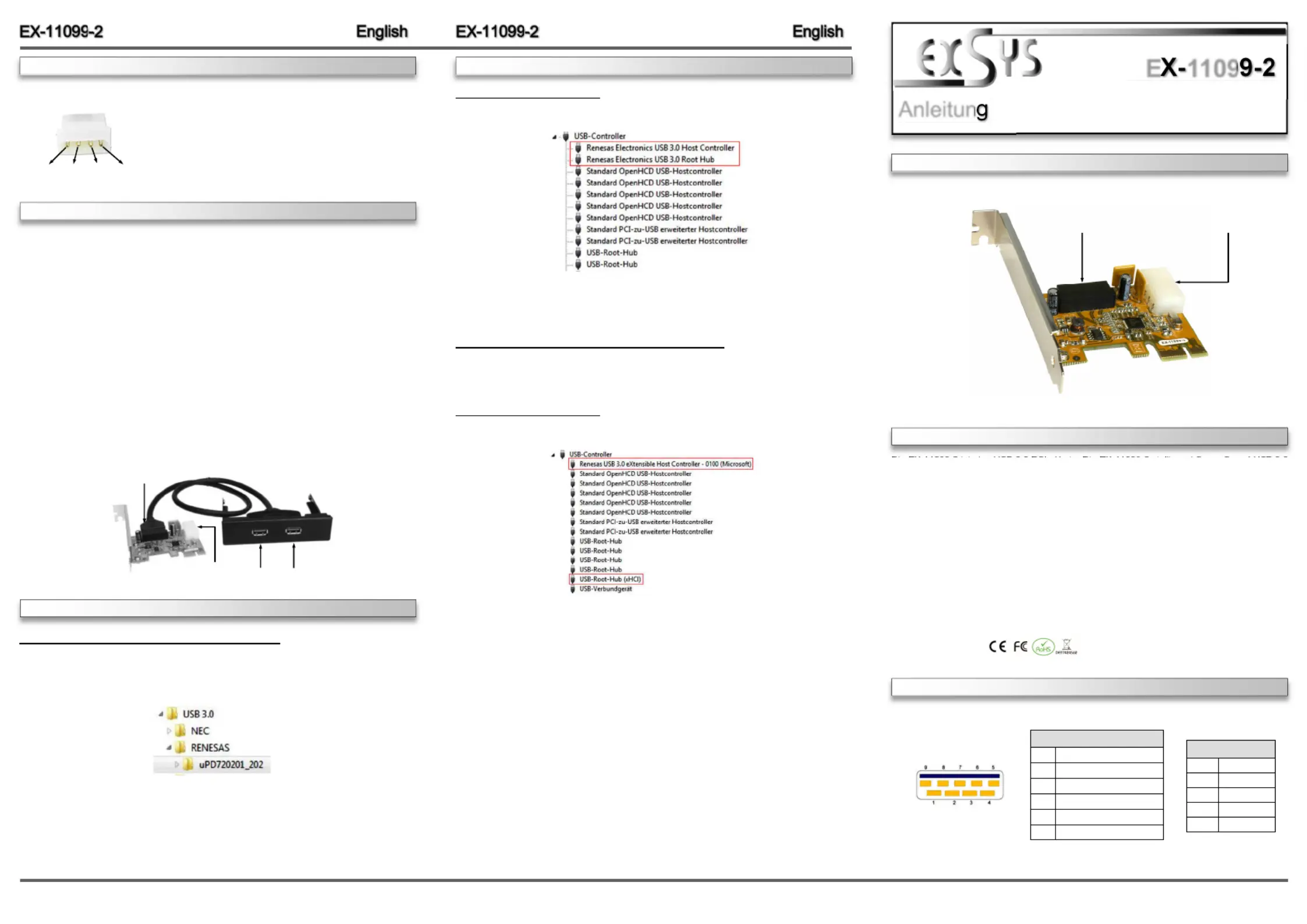
Die EX110992 ist eine USB 3.0 PCIe Karte. Die EX110992 stellt zwei SuperSpeed USB 3.0 -----
Ports in eine 3.5“ Schacht (Fronteinbau) zur Verfügung. Die EX110992 unterstützt die volle --
Leistung von 900mA an beiden externen Ports, jedoch wird hierfür zusätzlicher Strom vom PC-
Netzteil benötigt. Die EX110992 ist die perfekte Technologie für externe Speicher Gehäuse, --
digitale Kameras, Webcam, Scanner und mehr. Sie unterstützt alle PCIe Slots von x1 bis x16.
Der PCIExpress Bus unterstützt optimal die Leistung des schnellen Renesas Chipsatz. Die EX--
110992 gewährleistet so eine sichere Datenübertragung und exzellente Performance von bis -
zu 5Gbit pro Sekunde! Sie unterstützt alle USB Anschlüsse von 1.1 bis 3.1. Mit der EX110992 --
wird ein Standard Bügel mitgeliefert für die zwei USB Ports.
Kompatibilität:PCIExpress p1-x1 bis x16-
Betriebssysteme:Windows XP/ Vista/ 7/ 8.x/ 10/ Server 20xx
Anschlüsse:2x USB 3.0 ABuchse extern, 1x 20Pin Header, 1x 4Pin Molex---
Lieferumfang:EX110992, 3.5“ Fronteinbau HUB, Standard Bügel, Treiber CD, --
Anleitung
Zertifikate:
1
BESCHREIBUNG & TECHNISCHE DATEN
AUFBAU
Anleitun
Vers. 1.1 / 16.11.17
E1109
CHECK INSTALLED DRIVER
Open the >Device manager<.Now you should see at „USBController“ -the following new entry's:
If you see this or a similar information the device is installed correctly.
Windows 8.x/ 10/ Server 2012R2 / Server 2016
After the hardware installation, the operating system will recognize the device automatically and
install the drivers.
CHECK INSTALLED DRIVER
Open the >Device manager<.Now you should see at „USBController“ -the following new entry's:
If you see this or a similar information the device is installed correctly.
ANSCHLÜSSE
Windows XP/ Vista/ 7/ Server 2003 & 2008R2
After starting Windows is recognizes a new .Start the “USB (Universal Serial Bus)Controller“-
„“ file which is in the “uPD720201_202” folder (see picture):SETUP
Follow the installation instructions and complete the installation.
Windows will now install automatically you right driver for your particular operating system. After
the installation the operating system detects the card and automatically install them.
DRIVER INSTALLATION
J3: 20Pin Header Anschluss -
für USB 3.0 Buchse 1 & 2
J5: 4Pin Molex Power -
Anschluss für PCNetzteil-
USB 3.0 Buchse:
USB 2.0 Pin‘s
PinSignal
1VCC
2DATA-
3DATA+
4GND
USB 3.0 Pin‘s
PinSignal
5SSTX+
6SSTX-
7GND
8SSRX+
9SSRX-
HARDWAREINSTALLATION
CONNECTORS
J3
J5
USB 3.0 Buchse 1 & 2
DRIVER INSTALLATION
For support the 900mA at the USB ports, you need to connect J5
with the PC Power Supply.
Please make sure you connect the plug in the right direction!
Attention! Never connect or release the plug while the PC
power is on!
J5:
1
+12V
2
GND
3
GND
4
+5V
Please note the following installation instructions. Because there are large differences between the
PC’s, we can give you only a general installation instructions for the EX-11099-2. Please refer your
computer’s reference manual whenever in doubt.
1.Turn off the power to your computer and any other connected peripherals.
2.Remove the mounting screws located at the rear and/or sides panels of your Computer and
gently slide the cover off.
3.Install now the external power supply to the card (see at Connectors at J5).
4.Locate an available PCI-Express expansion slot and remove its covers from the rear panel of
your computer.
5.Align the EX-11099-2 with the expansion slot, and then gently but firmly, insert the card. Make
sure the card is seated and oriented correctly.
6.Then attach the card with a screw to the rear panel of the computer.
7.Install the 3.5-inch Front-Bay cable adapter and connect its cable to J3 connector.
8.Gently replace your computer’s cover and the mounting screws.
Product specificaties
| Merk: | EXSYS |
| Categorie: | Netwerkkaart/adapter |
| Model: | EX-11099-2 |
| Gewicht: | 500 g |
| Breedte: | 65 mm |
| Diepte: | 61 mm |
| Gebruikershandleiding: | Ja |
| Duurzaamheidscertificaten: | RoHS |
| Temperatuur bij opslag: | -20 - 80 °C |
| Intern: | Ja |
| Ondersteunt Linux: | Ja |
| Hostinterface: | Mini PCI Express |
| Meegeleverde drivers: | Ja |
| Bedrijfstemperatuur (T-T): | 0 - 55 °C |
| Relatieve vochtigheid in bedrijf (V-V): | 5 - 95 procent |
| Output interface: | USB 3.2 Gen 1 (3.1 Gen 1) |
Heb je hulp nodig?
Als je hulp nodig hebt met EXSYS EX-11099-2 stel dan hieronder een vraag en andere gebruikers zullen je antwoorden
Handleiding Netwerkkaart/adapter EXSYS

8 Juli 2026
6 Mei 2026
4 Mei 2026
3 Maart 2026
3 Maart 2026
3 Maart 2026
3 Maart 2026
2 Maart 2026
2 Maart 2026
2 Maart 2026
Handleiding Netwerkkaart/adapter
Nieuwste handleidingen voor Netwerkkaart/adapter
3 Augustus 2026
8 Juli 2026
8 Juli 2026
23 Juni 2026
23 Juni 2026
23 Juni 2026
22 Juni 2026
22 Juni 2026
18 Mei 2026
12 Mei 2026