Insignia NS-5004BT Handleiding
Bekijk gratis de handleiding van Insignia NS-5004BT (2 pagina’s), behorend tot de categorie Speaker. Deze gids werd als nuttig beoordeeld door 24 mensen en kreeg gemiddeld 4.8 sterren uit 4 reviews. Heb je een vraag over Insignia NS-5004BT of wil je andere gebruikers van dit product iets vragen? Stel een vraag
Pagina 1/2
QUICK SETUP GUIDE
Color Changing
2.1 Computer
Speakers with
Bluetooth
NS5004BT
CONNECTING WITH BLUETOOTH
1Make sure that your Bluetooth device is turned on and
within 33 feet (10 meters) of your speakers.
2Turn on your speakers. The status LED blinks blue to
indicate that they are in pairing mode. If the status LED
is red, press the button once to switch to Input
Bluetooth mode.
3Turn on your Bluetooth device, then turn on Bluetooth.
Set your device to pairing mode, then select Insignia
NS-5004BT. See the instructions that came with your
Bluetooth device for information about pairing.
4If you are asked for a password, enter 0000. When
pairing is complete, the status LED lights solid blue.
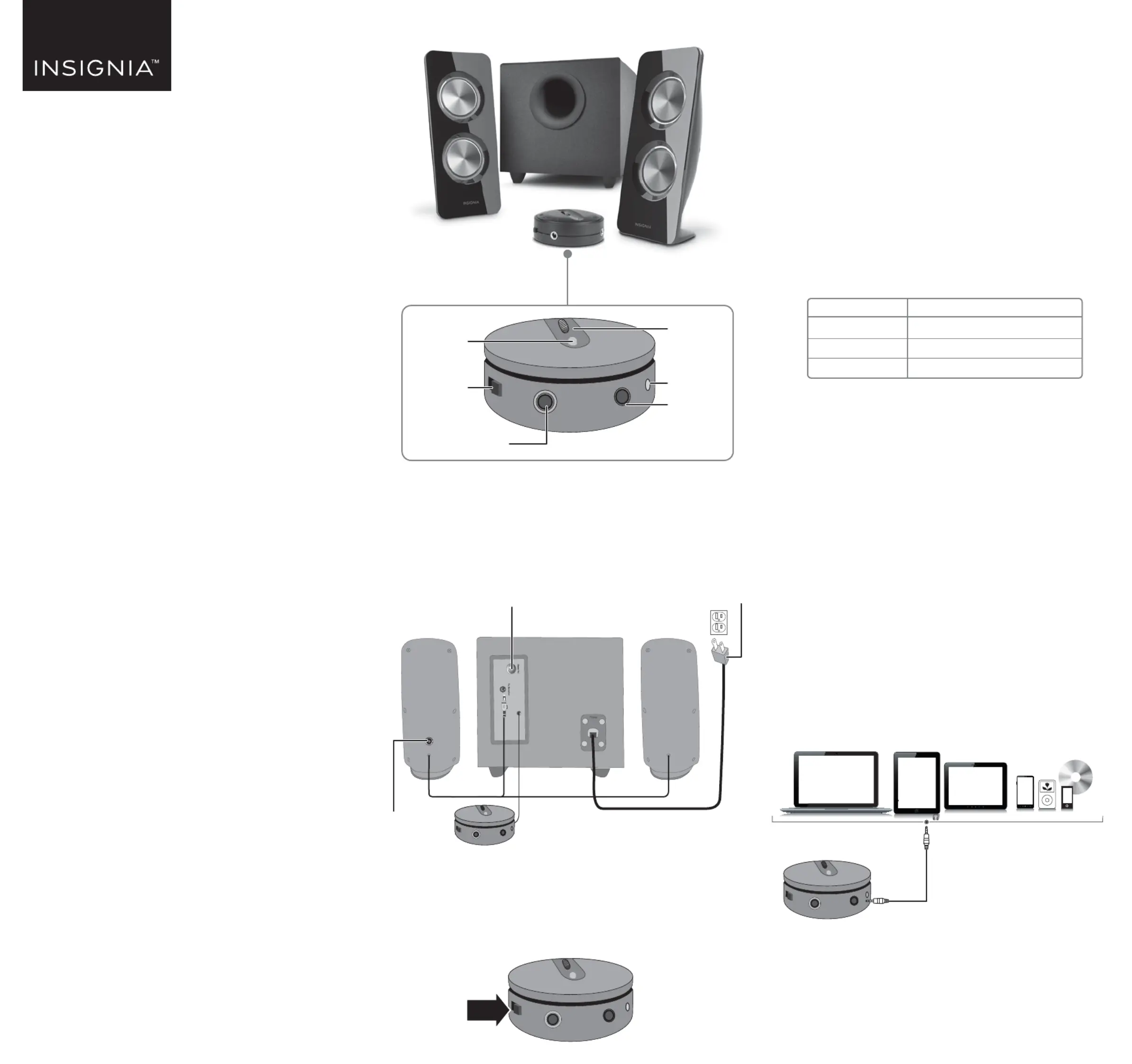
STATUS LED
RECONNECTING WITH A PREVIOUS DEVICE
• Make sure that the last paired Bluetooth device is near
your speakers.
• When your speakers are on, they automatically search
for and try to connect to the last paired device.
FORCE PAIRING AND CONNECTING WITH A
NEW DEVICE
• If you have paired your speakers to a device and want
to pair with a dierent device, press and hold the Input
button for three seconds until the blue LED begins
blinking. Search your new device’s Bluetooth list for
Insignia NS-5004BT, then tap to pair and connect.
USING A WIRED CONNECTION
1Connect an external sound source, such as an MP3
player, by plugging the included audio cable into the
AUX jack on the back of your control pod and the
sound source.
2Press the Input button to enter AUX mode. The status
LED lights red.
Front
Control pod
CONNECTING THE SPEAKERS
1Plug the satellite speakers into the To Speaker jack on
the back of the subwoofer.
2Plug the power cable into a power outlet or surge
protector.
TURNING YOUR SPEAKERS ON AND OFF
• Slide the ON/OFF on the control pod to the left to turn
on your speakers or right to turn o your speakers.
When you rst turn on your speakers, they are in
Bluetooth pairing mode and the status LED blinks blue.
Before using your new product, please read these instructions to prevent any damage.
STATUS LED
Blinks blue
Solid blue
Solid red
DESCRIPTION
Speakers are in pairing mode
Speakers are paired
AUX mode
3.5 mm audio cable
PACKAGE CONTENTS
• Satellite speakers (2)
• Subwoofer
• Control pod
• 5 ft. (1.52 m) 3.5 mm to 3.5 mm audio cable
• Quick Setup Guide
FEATURES
• Eight color modes (blue, green, red, purple, yellow,
light blue, repeating six colors, and o) help set the
mood
• 25W RMS:
• 16W RMS subwoofer
• 9W RMS satellites (4.5W + 4.5W)
• Bluetooth connectivity wirelessly streams audio from
your Bluetooth-enabled devices
• 3.5 mm input jack lets you connect to external sound
sources
• Headphone jack provides an easy connection option
for private listening
Master
volume control
Status LED
Input button
AUX
input jack
Headphone jack
Light button
RIGHT
LEFT
Back of speakers
Bass volume controlPower cord
Power on/o
Product specificaties
| Merk: | Insignia |
| Categorie: | Speaker |
| Model: | NS-5004BT |
Heb je hulp nodig?
Als je hulp nodig hebt met Insignia NS-5004BT stel dan hieronder een vraag en andere gebruikers zullen je antwoorden
Handleiding Speaker Insignia

11 Maart 2025
11 Maart 2025
18 Februari 2024
18 Februari 2024
18 Februari 2024
18 Februari 2024
8 Februari 2024
8 Februari 2024
8 Februari 2024
8 Februari 2024
Handleiding Speaker
Nieuwste handleidingen voor Speaker
23 Juli 2026
23 Juli 2026
22 Juli 2026
22 Juli 2026
22 Juli 2026
21 Juli 2026
21 Juli 2026
21 Juli 2026
21 Juli 2026
21 Juli 2026