Insignia NS-PCS41 Handleiding
Bekijk gratis de handleiding van Insignia NS-PCS41 (2 pagina’s), behorend tot de categorie Speaker. Deze gids werd als nuttig beoordeeld door 106 mensen en kreeg gemiddeld 4.1 sterren uit 2 reviews. Heb je een vraag over Insignia NS-PCS41 of wil je andere gebruikers van dit product iets vragen? Stel een vraag
Pagina 1/2
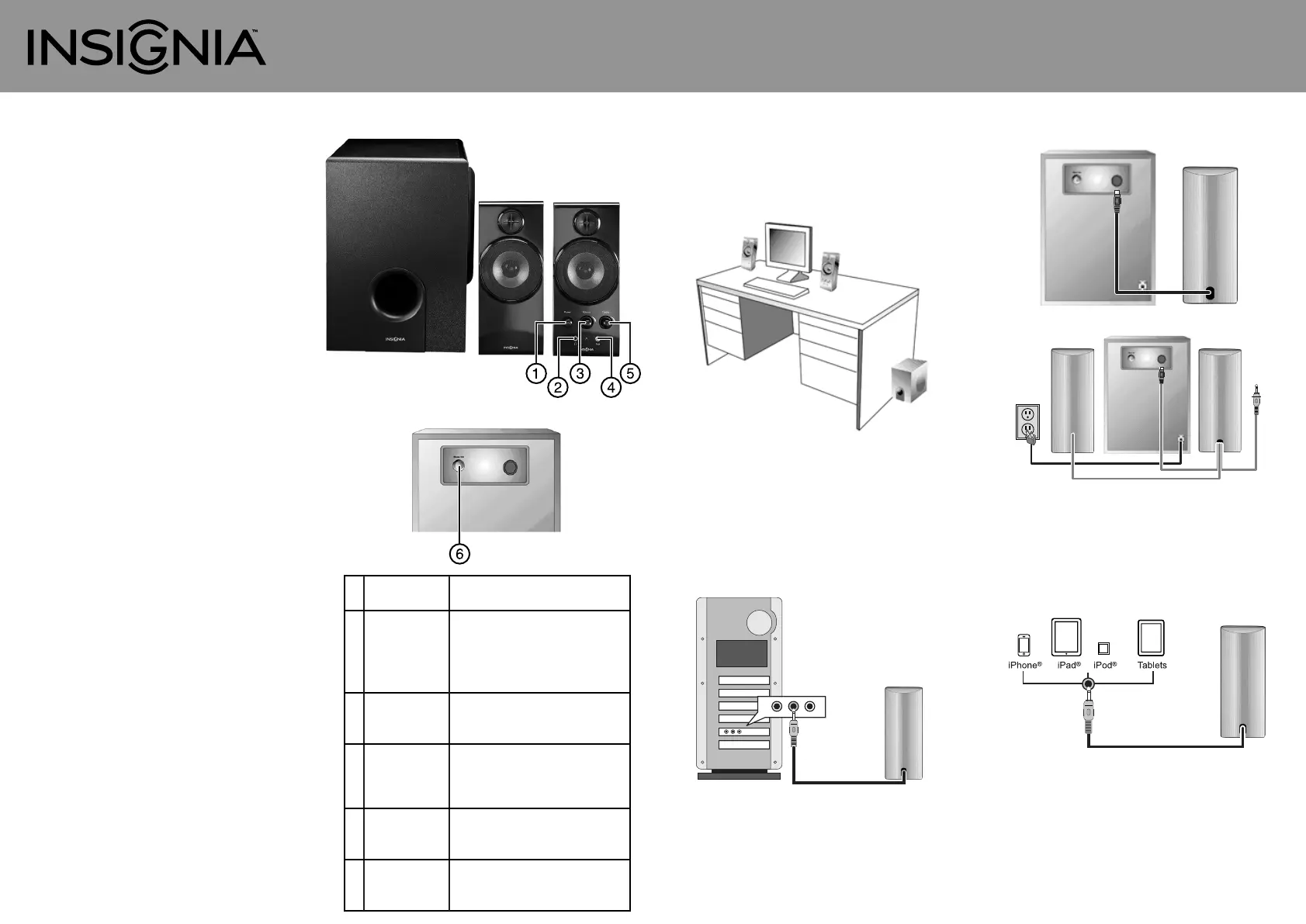
Quick Setup GuideI NS-PCS41 2.1 computer speakers
Congratulations on your purchase of a
high-quality Insignia product. Your
NS-PCS41 speaker system is designed for
reliable and trouble-free performance.
Package contents
• Satellite speakers (2)
• Subwoofer (1)
• Auxilliary input cable
• MP3 cradle
• Quick Setup Guide
1 Power button
2 Headphone
output jack
3 Master volume
control
4 Auxiliary input
jack
5 Treble volume
control
6 Bass volume
control
Press to turn on the speaker system. Press
again to turn the speaker system o.
Connect your favorite headphones to this
jack. They will mute the speaker system
automatically. The master volume control
can then be used to turn up or down the
volume to your headphones.
Rotate clockwise to turn the volume up or
counter-clockwise to turn the volume
down.
Connect a second source, such as an MP3
player, to this jack. This connection will
override your computer source
connection while it’s plugged in.
Rotate clockwise to turn treble volume up
or counter-clockwise to turn treble
volume down.
Rotate clockwise to turn bass volume up
or counter-clockwise to turn bass volume
down.
Features
Subwoofer (back)
Setting up your speaker system
Positioning your speaker system
1Place the speakers on opposite sides of the device
they are connected to and as far apart as possible.
2Place the subwoofer on the oor.
Connecting to a computer
1Make sure that the computer and your speaker
system are turned o and unplugged from the
power outlet.
2Plug the cable with the green plug on the right
speaker into the audio out jack on the computer
(this jack is usually green).
3Plug the cable with the red plug on the right
speaker into the jack on the subwoofer.
4Plug the AC cable into a wall outlet or power strip.
5Turn on the computer and your speaker system.
Connecting to portable audio devices
1Make sure the portable audio device and your
speaker system are turned o and unplugged.
2Plug the green audio cable attached to the speaker
into your audio device.
3Plug the cable with the red plug on the right
speaker into the jack on the subwoofer.
4Plug the AC cable into a wall outlet or power strip.
5 Turn on the portable audio device and your
speaker system.
Note: Portable audio devices can also be connected to the
auxiliary input jack on the back of the right speaker using the
included auxilliary cable.
Note: MP3 player can be placed in the included cradle.
Troubleshooting
WARNING: To reduce the risk of re or electric shock,
Importantsafetyinformation
LegalNotices
NS-PCS41_12-0799_QSG_V3_EN.ai18/30/20123:26:25PMNS-PCS41_12-0799_QSG_V3_EN.ai 1 8/30/2012 3:26:25 PM
Product specificaties
| Merk: | Insignia |
| Categorie: | Speaker |
| Model: | NS-PCS41 |
Heb je hulp nodig?
Als je hulp nodig hebt met Insignia NS-PCS41 stel dan hieronder een vraag en andere gebruikers zullen je antwoorden
Handleiding Speaker Insignia

11 Maart 2025
11 Maart 2025
18 Februari 2024
18 Februari 2024
18 Februari 2024
18 Februari 2024
8 Februari 2024
8 Februari 2024
8 Februari 2024
8 Februari 2024
Handleiding Speaker
Nieuwste handleidingen voor Speaker
23 Juli 2026
23 Juli 2026
22 Juli 2026
22 Juli 2026
22 Juli 2026
21 Juli 2026
21 Juli 2026
21 Juli 2026
21 Juli 2026
21 Juli 2026