Asus ZenPower Combo Handleiding
Bekijk gratis de handleiding van Asus ZenPower Combo (2 pagina’s), behorend tot de categorie powerbank. Deze gids werd als nuttig beoordeeld door 95 mensen en kreeg gemiddeld 4.8 sterren uit 4 reviews. Heb je een vraag over Asus ZenPower Combo of wil je andere gebruikers van dit product iets vragen? Stel een vraag
Pagina 1/2
User Manual
Model: ABTU006
A10997
Revised Edition V2
November 2015
Product Features
•
All-in-one design: Adapter, cable and power bank all
integrated together into a single unit.
•
Quick charging®™: Supports Qualcomm Quick Charge
2.0*.
• When using embedded 18W adapter, Quick recharging:
it takes less than 3.5 hours to fully recharge ZenPower
Combo.
• Charges two devices at the same time.Dual port design:
•
High capacity: Allows charging ZenFone 2 (3000mAh) for
more than 2 times.
•
Safety: Exclusive ASUS PowerSafe technology to protect
you and your device.
•
Durable: Passed the high standard USB connector
durability test for 5,000 times.
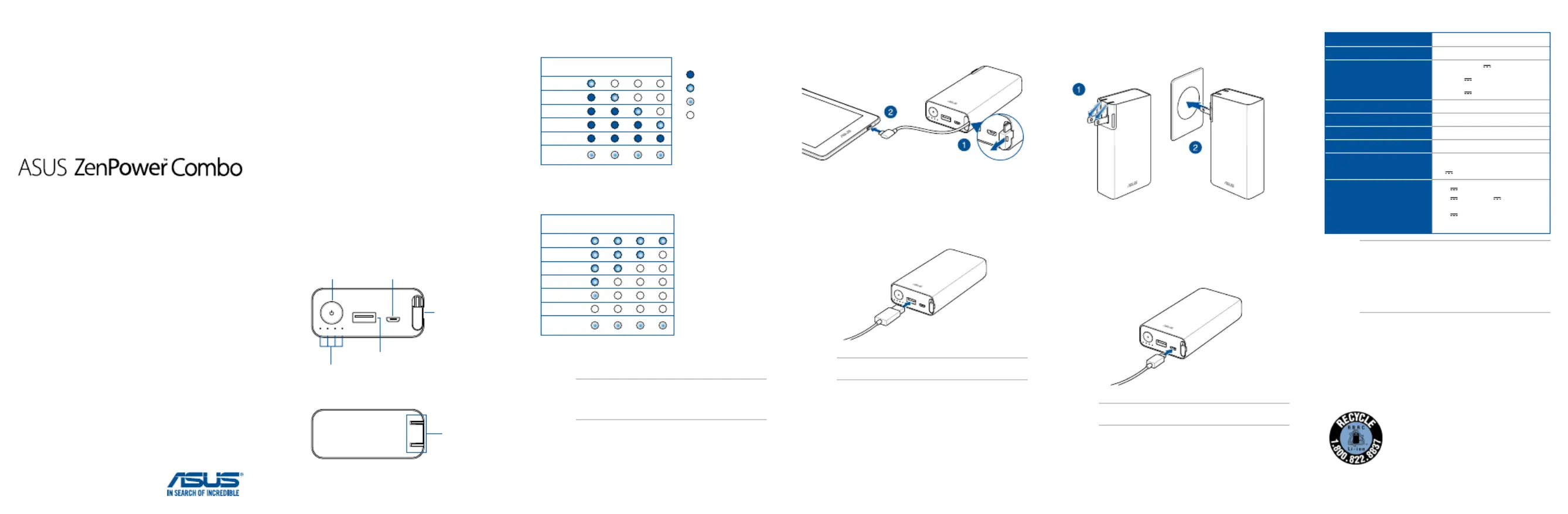
Getting to know your Power Bank
Front View
Rear view
Micro USB
(input) port
Built-in micro USB
(output) cable with
Qualcomm® Quick
Charge™
2.0
Built-in adapter
(input)
USB (output)
port
LED indicators
Power button
1234
* Quick charging performance applies to mobile devices which support
Qualcomm Quick Charge®™
2.0.
LED indicator information
LED Color status
Charging the Power Bank
Charge
status
LED 1LED 2LED 3LED 4
0 - 25%
25% - 50%
50% - 75%
75% - 100%
Finished
Error
detected*
On
Blinking
Rapid blinking
O
Charging devices using the Power Bank
Discharge
status
LED 1LED 2LED 3LED 4
75% - 100%
50% - 75%
25% - 50%
5% - 25%
< 5%
0%
Error
detected*
* To stop the Power Bank from blinking when an error is detected, replug
the cable from the Power Bank.
NOTE:
When you press the power button of the Power Bank
without charging a device on it, the LED indicators light up to
display its power status. It turns o after 5 seconds.
Using the Power Bank
Using the built-in micro USB cable
Using a micro USB cable
NOTE:The micro USB cable is purchased separately.
Using the built-in adapter
Using a micro USB cable
NOTE:The micro USB cable is purchased separately.
Charging the Power BankSpecications
Cell type
Rechargeable lithium-ion cell
Cell capacity
3.6V / 10050 mAh(36Wh)
Charging time
(Charging times may dier
when using dierent
cables)
< 3.5hr (A/D, 9V 2A)
< 6hr (5V 2A)
< 9hr (5V 1A)
Charging temperature
0° C - 35° C
Size
117.4 x 62 x 28 mm
Built-in cable length
75 ± 3 mm
Weight
290 ± 3g
AC Input
100-240V~ 50-60Hz 0.5A
DC Input
5V 2A
Output 1
(supports Qualcomm®
Quick Charge™ 2.0)
5.1V 2.4A or
9.1V 2A or 12.1V 1.5A
Output 2
5.1V 2.4A
Output 1+2
23.5W (Max)
Safety Notices
• Fully charge the Power Bank before using it for the rst time.
• Disconnect your device from the Power Bank once it becomes fully
charged.
• Never attempt to disassemble and reassemble the Power Bank.
• Do not operate the Power Bank beyond 60°C (140°F) environment, nor
subject it to water or re, or any attempt to break the casing.
• Please ensure the plug is fully ipped out before using the built-in
adapter.
Rechargeable Battery Recycling Service in North America
For US and Canada customers, you can call 1-800-822-8837 (toll-free) for
recycling information of your ASUS products’ rechargeable batteries.
NOTE:
•
Quick charging performance applies to mobile devices
which support Qualcomm Quick Charge™ 2.0.®
• When charging a device that doesn’t comply with
Qualcomm Quick Charge™ 2.0, the output voltage will ®
be 5.1V (typ).
Product specificaties
| Merk: | Asus |
| Categorie: | powerbank |
| Model: | ZenPower Combo |
Heb je hulp nodig?
Als je hulp nodig hebt met Asus ZenPower Combo stel dan hieronder een vraag en andere gebruikers zullen je antwoorden
Handleiding powerbank Asus

9 December 2024
15 November 2024
12 September 2023
2 April 2023
Handleiding powerbank
Nieuwste handleidingen voor powerbank
25 Augustus 2026
22 Augustus 2026
21 Augustus 2026
19 Augustus 2026
19 Augustus 2026
19 Augustus 2026
19 Augustus 2026
18 Augustus 2026
18 Augustus 2026
18 Augustus 2026