Klark Teknik Air Link DW 20BR Handleiding
Klark Teknik Receiver Air Link DW 20BR
Bekijk gratis de handleiding van Klark Teknik Air Link DW 20BR (9 pagina’s), behorend tot de categorie Receiver. Deze gids werd als nuttig beoordeeld door 31 mensen en kreeg gemiddeld 4.7 sterren uit 2 reviews. Heb je een vraag over Klark Teknik Air Link DW 20BR of wil je andere gebruikers van dit product iets vragen? Stel een vraag
Pagina 1/9
Quick Start Guide
V 1.0
Getting Started
1. Connect the DW 20T inputs to an original audio source such as a mixer or media player, then connect the outputs of the DW 20R to a destination such as a mixer, amplier,
or active speaker. Leave the amp or speakers turned o for now.
2. Connect the power adapters to each unit. They will power on automatically and their PAIR buttons will blink slowly to indicate standby mode.
3. Press and hold the PAIR button on the DW 20T for 4 seconds. The LED ring will ash rapidly to indicate that it is trying to pair, and will continue trying for up to 30 seconds.
4. Within 30 seconds of initiating the DW 20T for pairing, press and hold the PAIR button on the DW 20R for 4 seconds as well. Its LED ring will ash rapidly.
5. When successfully paired, the LED rings on both the 20T and 20R will light solid (not ashing). If either unit’s LED ring ashes slowly, this indicates that pairing was unsuccessful.
Make sure both units are free of obstructions and are within 100 feet / 30 meters of each other.
6. After all audio and power connections have been made, power on the amplier or active speakers.
Pairing multiple DW 20R units with a DW 20T
1. Connect the DW 20T and the rst DW 20R as described in ‘Getting Started’ (hold each PAIR button for 4 seconds).
2. On the second DW 20R unit, hold the PAIR button for 4 seconds to activate pairing, then let it search for 30 seconds. The pairing function will time out after 30 seconds
and the LED will blink slowly.
3. Press the DW 20T PAIR button for 4 seconds, and then press the second DW 20R unit’s PAIR button for 4 seconds. Both DW 20R units will now be connected to the same DW 20T.
4. Note - holding the PAIR button for 10 seconds on the DW 20T will clear the memory of connected DW 20R units.
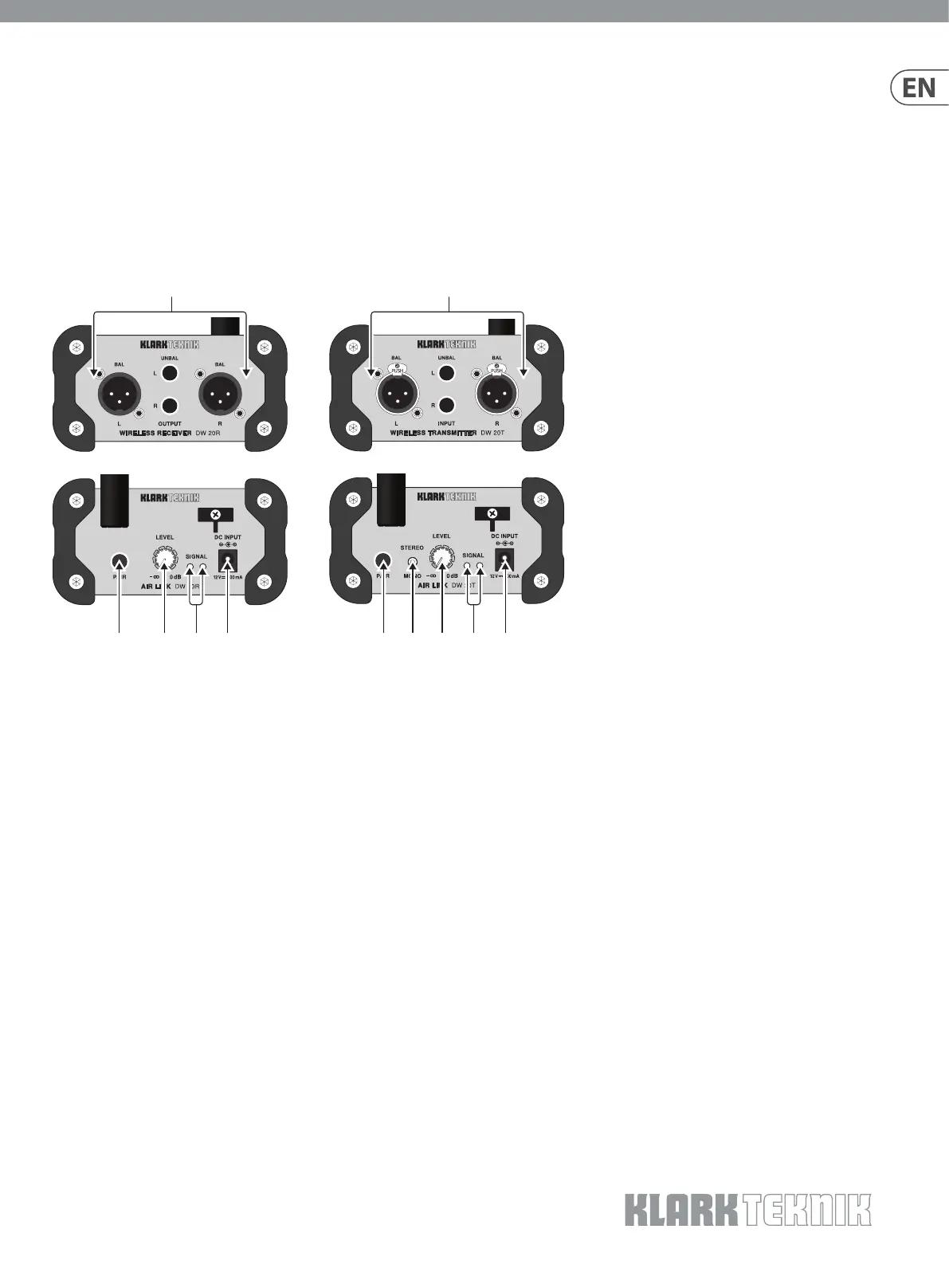
AIR LINK DW 20R/DW 20T
2.4 GHz Wireless Stereo Receiver/Transmitter
for High-Performance Stereo Audio Broadcasting
(1) PAIR button enables the unit to become available
for pairing by pressing and holding for 4 seconds.
The LED ring will indicate the current status.
See the Getting Started section for details.
(2) LEVEL knob adjusts the volume of the signal sent
to the output jacks.
(3) SIGNAL LEDs light when the DW 20R receives
an audio signal from the DW 20T.
(4) DC INPUT socket accepts the included power
adapter.
(5) STEREO/MONO switch determines whether the
outgoing wireless audio signal is stereo or mono.
(6) LEVEL knob adjusts the sensitivity of the inputs.
(7) SIGNAL LEDs light green when signal is present
at the inputs. The LEDs light red when the incoming
audio signal clips the inputs. If this happens, lower
the output level of the source audio.
(8) OUTPUT jacks send a line-level audio signal to
another audio device (mixer, amplier, etc.) via
balanced XLR or unbalanced ¼" TS cables.
(9) INPUT jacks accept audio signals via balanced XLR
or unbalanced ¼" TS cables.
(1)(2)(4)(3)
(8)(9)
(1)(6)(4)(7)(5)
Product specificaties
| Merk: | Klark Teknik |
| Categorie: | Receiver |
| Model: | Air Link DW 20BR |
Heb je hulp nodig?
Als je hulp nodig hebt met Klark Teknik Air Link DW 20BR stel dan hieronder een vraag en andere gebruikers zullen je antwoorden
Handleiding Receiver Klark Teknik

3 Augustus 2023
3 Augustus 2023
3 Augustus 2023
Handleiding Receiver
Nieuwste handleidingen voor Receiver
25 Augustus 2026
19 Augustus 2026
18 Augustus 2026
15 Augustus 2026
12 Augustus 2026
11 Augustus 2026
11 Augustus 2026
10 Augustus 2026
10 Augustus 2026
7 Augustus 2026