JLab NIGHTFALL Gaming Wired Headset Handleiding
Bekijk gratis de handleiding van JLab NIGHTFALL Gaming Wired Headset (3 pagina’s), behorend tot de categorie Headset. Deze gids werd als nuttig beoordeeld door 88 mensen en kreeg gemiddeld 4.3 sterren uit 6 reviews. Heb je een vraag over JLab NIGHTFALL Gaming Wired Headset of wil je andere gebruikers van dit product iets vragen? Stel een vraag
Pagina 1/3
NIGHTFALL GAMING
WIRELESS HEADSET
We love that you are rocking JLab!
We take pride in our products and fully stand behind them.
YOUR WARRANTY
All warranty claims are subject to JLab authorization
and at our sole discretion. Retain your proof of
purchase to ensure warranty coverage.
CONTACT US
Reach out to us at [email protected]
or visit jlab.com/contact
REGISTER TODAY
jlab.com/register
Product updates | How-to tips
FAQs & more
L
I
M
I
T
E
D
T
W
O
Y
E
A
R
W
A
R
R
A
N
T
Y
S
U
P
P
O
R
T
T
E
A
M
#
T
E
A
M
J
L
A
B
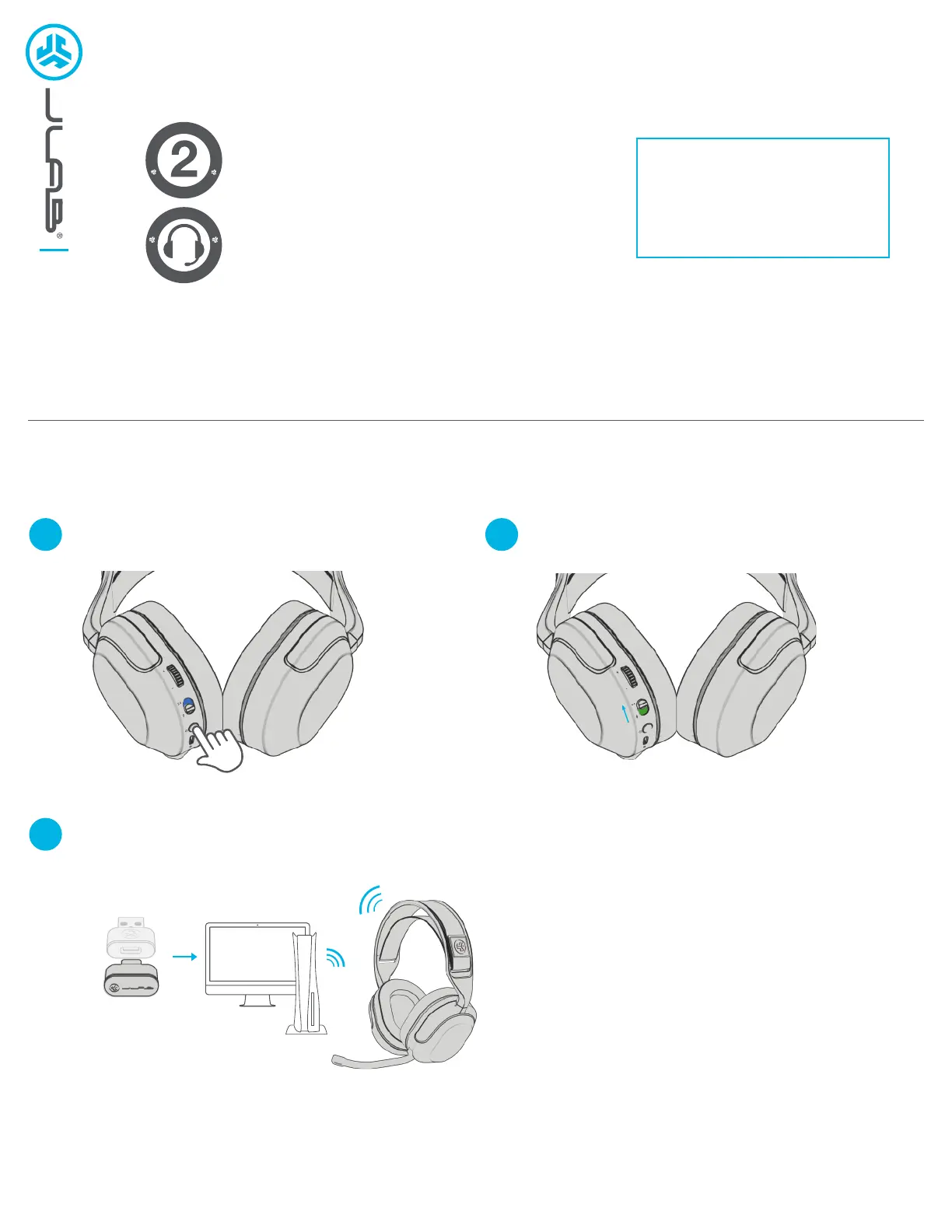
DONGLE CONNECTION
1
3
2
Latency is lowest in 2.4ghz mode, recommended for gaming.
Slide connection switch into 2.4 dongle modePress Hold multifunction button for 3 seconds to turn on
Plug dongle directly into USB-C port or use adapter to plug into USB-A port.
Dongle will work with PC, Mac, PS5, Switch, USB-C tablets and phones
Product specificaties
| Merk: | JLab |
| Categorie: | Headset |
| Model: | NIGHTFALL Gaming Wired Headset |
Heb je hulp nodig?
Als je hulp nodig hebt met JLab NIGHTFALL Gaming Wired Headset stel dan hieronder een vraag en andere gebruikers zullen je antwoorden
Handleiding Headset JLab

7 Juli 2025
15 November 2024
30 Juli 2024
8 Juni 2024
8 Juni 2024
8 Juni 2024
9 April 2024
5 Januari 2024
17 November 2023
17 Augustus 2023
Handleiding Headset
Nieuwste handleidingen voor Headset
7 Maart 2026
6 Maart 2026
5 Maart 2026
3 Maart 2026
3 Maart 2026
26 Februari 2026
25 Februari 2026
24 Februari 2026
23 Februari 2026
23 Februari 2026