Genaray RSF-11-R Handleiding
Genaray Afstandsbediening RSF-11-R
Bekijk gratis de handleiding van Genaray RSF-11-R (2 pagina’s), behorend tot de categorie Afstandsbediening. Deze gids werd als nuttig beoordeeld door 12 mensen en kreeg gemiddeld 4.5 sterren uit 6 reviews. Heb je een vraag over Genaray RSF-11-R of wil je andere gebruikers van dit product iets vragen? Stel een vraag
Pagina 1/2
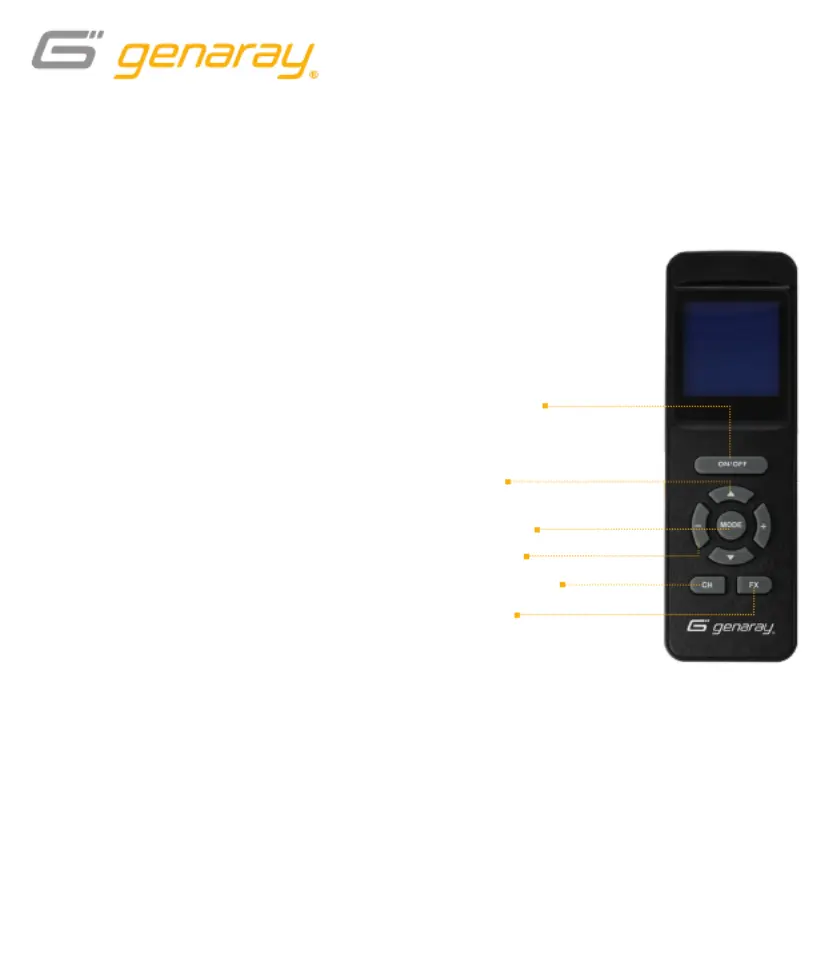
Press the up anddownbuttons to select
the adjustable values in CCT and RGB
modes, and to set the channel.
Once a value is highlighted, press the
– and+buttons to adjust the selected value.
Mode Button
Press toggle between CCT and RGB modes.
Channel Button
In a multi-light setup, channel selection lets
you control lights individually or in groups.
· Press to highlight the current
channel selection.
· Use the – and + buttons
to select a channel.
· Press the channel button again to
accept and set the channel selection.
On/Off Button
· Press and hold to put the Mini Moon
RGB to sleep without powering it off.
· Press again to resume operation.
FX Button
Press to enter FX mode and begin
playing the selected effect.
· Pressing the FX button in CCT mode
will open a list of effects that use
variations of color temperature.
· Pressing the FX button in RGB mode
will open a different list of effects that
use the Mini Moon’s RGB LEDs.
Wireless Remote for the Genaray Mini Moon RGB
RSF-11-R
On/Off button
(sleep mode)
FX button
Up/down
buttons
+/− buttons
Mode button
Channel button
Product specificaties
| Merk: | Genaray |
| Categorie: | Afstandsbediening |
| Model: | RSF-11-R |
Heb je hulp nodig?
Als je hulp nodig hebt met Genaray RSF-11-R stel dan hieronder een vraag en andere gebruikers zullen je antwoorden
Handleiding Afstandsbediening Genaray

12 December 2024
12 December 2024
12 December 2024
4 April 2023
9 Februari 2023
7 Januari 2023
Handleiding Afstandsbediening
Nieuwste handleidingen voor Afstandsbediening
3 Augustus 2026
11 Juli 2026
9 Juli 2026
7 Juni 2026
4 Mei 2026
24 Maart 2026
23 Maart 2026
16 Maart 2026
13 Maart 2026
12 Maart 2026