White Lightning BMC24 Handleiding
Bekijk gratis de handleiding van White Lightning BMC24 (2 pagina’s), behorend tot de categorie Niet gecategoriseerd. Deze gids werd als nuttig beoordeeld door 20 mensen en kreeg gemiddeld 4.4 sterren uit 5 reviews. Heb je een vraag over White Lightning BMC24 of wil je andere gebruikers van dit product iets vragen? Stel een vraag
Pagina 1/2
SmartGPU™ Battery Maintenance Charger
Our SmartGPUs feature an easy-to-install option for Battery
Maintenance Charging. Follow these steps to install the model
BMC24 upgrade for the SmartGPU. A helpful video is also available
on our website, or scan the QR code.
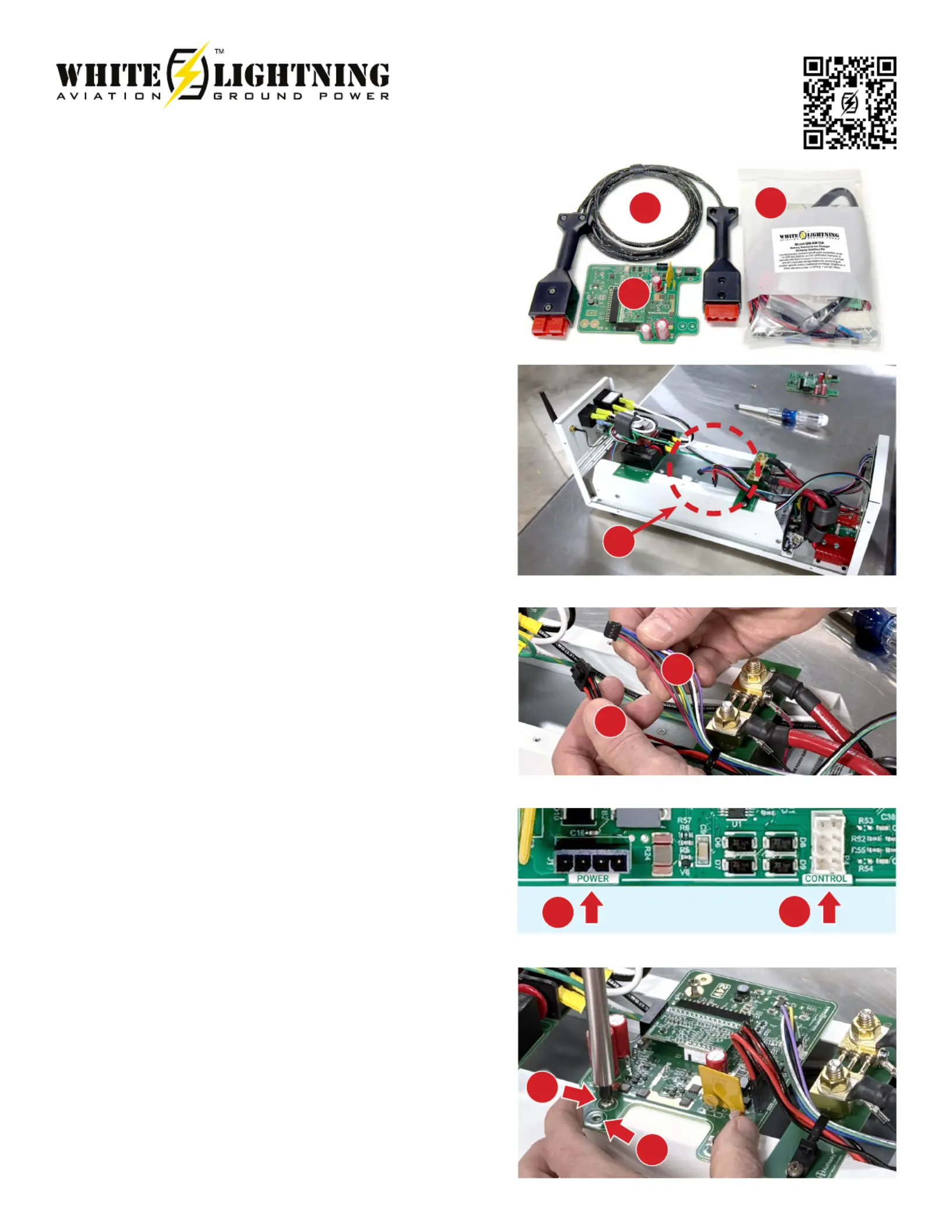
Kit Contents
(A) charging cable
(B) printed circuit board assembly (PCA)
(C) battery wiring kit for your aircraft
Give the harness kit to your mechanic to install on your aircraft. The
kit is eligible to be installed as a minor alteration and approved with
a simple airframe maintenance log entry.
Installation
Tools required: #2 Philips head screwdriver.
Disconnect all input and output cables from the GPU and place it on
a clean surface. Remove the 8 screws, that secure the top cover to
the GPU chassis and set aside.
Be careful not to disturb or touch any components or wires outside
of the installation area (D).
There are 2 wiring harnesses that connect to the PCA – a
4-conductor POWER harness (E) with larger red and black
wires, and an 8-conductor CONTROL harness (F) with smaller,
multicolored wires. Each harness is designed so that it can only be
plugged into one location and in one orientation.
On the PCA, there are 2 corresponding receptacles for these
harness plugs, one marked POWER and the other marked
CONTROL.
Hold the PCA in one hand and plug in the red & black power
harness onto the mating POWER receptacle on the PCA. The
connector will snap and lock into place when fully inserted. A gentle
tug will assure that it cannot come loose.
Plug the multicolor 8-pin harness onto the mating CONTROL
receptacle. It is also keyed so that it can only be inserted one way.
These connections do not require a great deal of force, so if either
does not seem to t easily, stop, look closely, and verify proper
orientation before proceeding.
With the harnesses connected, the PCA is ready to fasten to the
mounting rails with the hardware provided.
Place the PCA on the mounting rails so that the holes align as
shown. Mounting holes for Model S28114 are pictured (G). Note: the
S28054 holes match the outer set of PCA screw holes (H). Use the 2
Philips head screws with integral lock-washers to secure it in place.
Hand tighten snuggly but don’t over torque.
Check the connections before nishing the installation:
• Power harness connected
• Control harness connected
• PCA secured to the mounting rails
Model BMC24
Installation Video
D
E
E
G
F
F
H
A
B
C
Product specificaties
| Merk: | White Lightning |
| Categorie: | Niet gecategoriseerd |
| Model: | BMC24 |
Heb je hulp nodig?
Als je hulp nodig hebt met White Lightning BMC24 stel dan hieronder een vraag en andere gebruikers zullen je antwoorden
Handleiding Niet gecategoriseerd White Lightning

24 Augustus 2025
5 Maart 2024
5 Maart 2024
5 Maart 2024
5 Maart 2024
5 Maart 2024
Handleiding Niet gecategoriseerd
Nieuwste handleidingen voor Niet gecategoriseerd
30 Augustus 2026
30 Augustus 2026
30 Augustus 2026
30 Augustus 2026
30 Augustus 2026
29 Augustus 2026
29 Augustus 2026
29 Augustus 2026
29 Augustus 2026
29 Augustus 2026