Savio Astral Handleiding
Savio Toetsenbord Astral
Bekijk gratis de handleiding van Savio Astral (2 pagina’s), behorend tot de categorie Toetsenbord. Deze gids werd als nuttig beoordeeld door 19 mensen en kreeg gemiddeld 4.7 sterren uit 5 reviews. Heb je een vraag over Savio Astral of wil je andere gebruikers van dit product iets vragen? Stel een vraag
Pagina 1/2
1
+
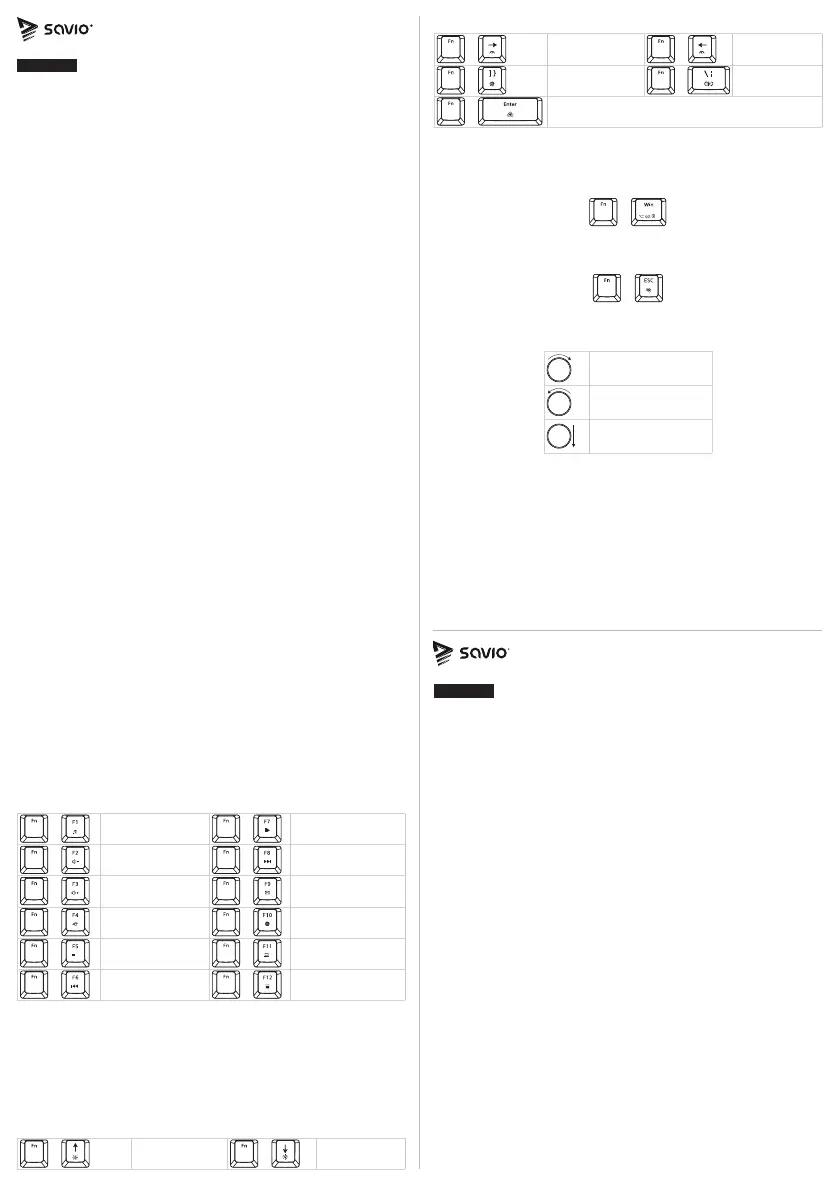
Increase effect
speed
+
Decrease ef-
fect speed
+
Turn on /
off backlight
+
Change backli-
ght mode
+
Change backlight color
8. Blocking the Windows key:
To block the WINDOWS key press FN + Win. To go back to previ-
ous setting, press FN + Win again. FN + Win
–
Block / Unblock the
WINDOWS key.
+
9. Keyboard default settings:
To restart the keyboard, press FN + ESC for 3 seconds.
+
10. Multimedia knob has the following functions:
Volume increase
Volume decrease
Mute
11. Safety conditions:
•
Use the product in accordance with its intended use, as im-
proper use may damage the product.
•
Do not expose the device to moisture, heat or sunlight, do not
use the product in a dusty environment.
• The device should be cleaned only with a dry cloth.
•
Independent repairs and modication result automatic loss
of the warranty.
• Hitting or dropping may damage the product.
• The product is not a toy, keep out of reach of children.
1. Keyboard’s main features:
• OUTEMU White Jade magnetic switch.
• RGB backlight with 18 modes to choose from.
• Switch lifespan: 100 000 000 keystrokes.
• Multi-layer Gasket structure: metal plate with silicone gaskets,
shock-absorbing foam & noise-absorbing foam.
•
Keys are made with PBT technology. This prevents the key labels
from wearing off during use.
•
N-key rollover & Anti-ghosting – a feature enabling pressing
many keys at the same time.
• Multimedia knob allowing to control sound.
•
Balanced design and rubberized feet prevent the keyboard
from sliding during use.
•
Two-step rubber leg stands enable nding the ideal keyboard angle.
•
Dedicated software allows full backlighting conguration and
creating macros.
• Detachable USB-C braided cable.
2. Package contents:
• Magnetic keyboard
• User manual
• USB-A – USB-C cable
• Keycap and switch puller
3. Technical specication:
• Keyboard type: Magnetic
• Keyboard layout: US (82 keys)
• Interface: USB
• Keycaps: PBT (color depending on the model)
• Switches: OUTEMU White Jade magnetic
• Switch lifespan: 100 000 000 keystrokes
•
Multi-layer Gasket structure: Metal plate with silicone gaskets,
shock-absorbing foam & noise-absorbing foam
• Keyboard dimensions: 325 × 135 × 38 mm
• Keyboard weight: 700 +/- 10 g
• Software: Yes
• N-key rollover & Anti-ghosting: Full
• Macro support: Yes
• Cable length: 1.8 m
•
Compatibility: Windows XP, Vista, Win 7 / 8 / 10 / 11, Linux,
macOS, Android
4. Device installation:
4.1 Connect the keyboard to the PC, laptop, etc. using USB-A –
USB-C cable that was added to the set. The system will au-
tomatically recognise, download and install drivers.
4.2The keyboard is ready to use.
5. Software installation:
To get full conguration access, you have to download and install
dedicated software from our website: www.savio.pl/download. After
the download, double-click on the icon and follow the suggestions.
After the successful installation, you will see the software icon on
the desktop. Double click the icon to open the settings interface.
6. Multimedia activation key shortcuts:
+
Music
+
Play / Pause
+
Decrease volume
+
Next track
+
Increase volume
+
E-mail
+
Mute
+
Internet browser
+
Stop
+
My computer
+
Previous track
+
Calculator
7. Backlighting mode:
The keyboard features 18 backlight modes. To change back-
light mode you need to press FN + |\. To change back-
light color (this functionality works with some modes), press
FN + Enter. The keyboard also features changing the back-
light intensity. Press FN + Arrow Up / Down to increase /
decrease light intensity. Press FN + Arrow Left / Right to decrease /
increase effects speed.
+
Increase bac-
klight intensity
+
Decrease bac-
klight intensity
1. Główne cechy klawiatury:
• Przełączniki magnetyczne OUTEMU White Jade.
• Podświetlenie RGB z 18 trybami do wyboru.
• Żywotność przełączników: 100 000 000 naciśnięć.
•
Wielowarstwowa konstrukcja typu Gasket: metalowa płyta
z silikonowymi uszczelkami, pianka tłumiąca wstrząsy i pianka
wygłuszająca.
•
Nakładki klawiszy wykonane w technologii PBT – nadruki nie
ścierają się podczas użytkowania.
•
N-key rollover & Anti-ghosting – funkcja umożliwiająca wciśnię-
cie wielu klawiszy jednocześnie.
• Pokrętło multimedialne do regulacji głośności.
•
Odpowiednie wyważenie oraz gumowe stopki zapobiegające
przemieszczaniu się klawiatury podczas użytkowania.
•
Dwustopniowe gumowane nóżki umożliwiają znalezienie ideal-
nego kąta nachylenia klawiatury.
•
Dedykowane oprogramowanie umożliwiające pełną kongu-
rację podświetlenia klawiatury i tworzenie makr.
• Odpinany kabel USB-C w oplocie.
2. Zawartość opakowania:
• Klawiatura magnetyczna
• Instrukcja obsługi
• Kabel USB-A – USB-C
• Narzędzie do wyjmowania klawiszy i przełączników
3. Specykacja techniczna:
• Typ klawiatury: Magnetyczna
• Układ klawiatury: US (82 klawiszy)
• Interfejs: USB
• Keycapy: PBT (kolor w zależności od modelu)
• Przełączniki: OUTEMU White Jade magnetic
• Żywotność przełączników: 100 000 000 kliknięć
•
Wielowarstwowa konstrukcja typu Gasket: Metalowa pły-
Magnetic keyboard
SAVIO ASTRAL/ASTRAL WHITE
ENGLISH
User manual
Klawiatura magnetyczna
SAVIO ASTRAL/ASTRAL WHITE
POLSKI
Instrukcja obsługi
Attention: On macOS these key shortcuts may have different effects.
Product specificaties
| Merk: | Savio |
| Categorie: | Toetsenbord |
| Model: | Astral |
Heb je hulp nodig?
Als je hulp nodig hebt met Savio Astral stel dan hieronder een vraag en andere gebruikers zullen je antwoorden
Handleiding Toetsenbord Savio

5 Maart 2026
29 December 2026
7 Oktober 2025
7 Oktober 2025
20 Mei 2025
29 Maart 2025
7 Februari 2025
7 Februari 2025
7 Februari 2025
25 Juni 2024
Handleiding Toetsenbord
Nieuwste handleidingen voor Toetsenbord
19 Augustus 2026
12 Augustus 2026
10 Augustus 2026
14 Juli 2026
14 Juli 2026
13 Juli 2026
11 Juli 2026
11 Juli 2026
10 Juli 2026