KTC H24F8 Handleiding
Bekijk gratis de handleiding van KTC H24F8 (2 pagina’s), behorend tot de categorie Monitor. Deze gids werd als nuttig beoordeeld door 25 mensen en kreeg gemiddeld 4.2 sterren uit 2 reviews. Heb je een vraag over KTC H24F8 of wil je andere gebruikers van dit product iets vragen? Stel een vraag
Pagina 1/2
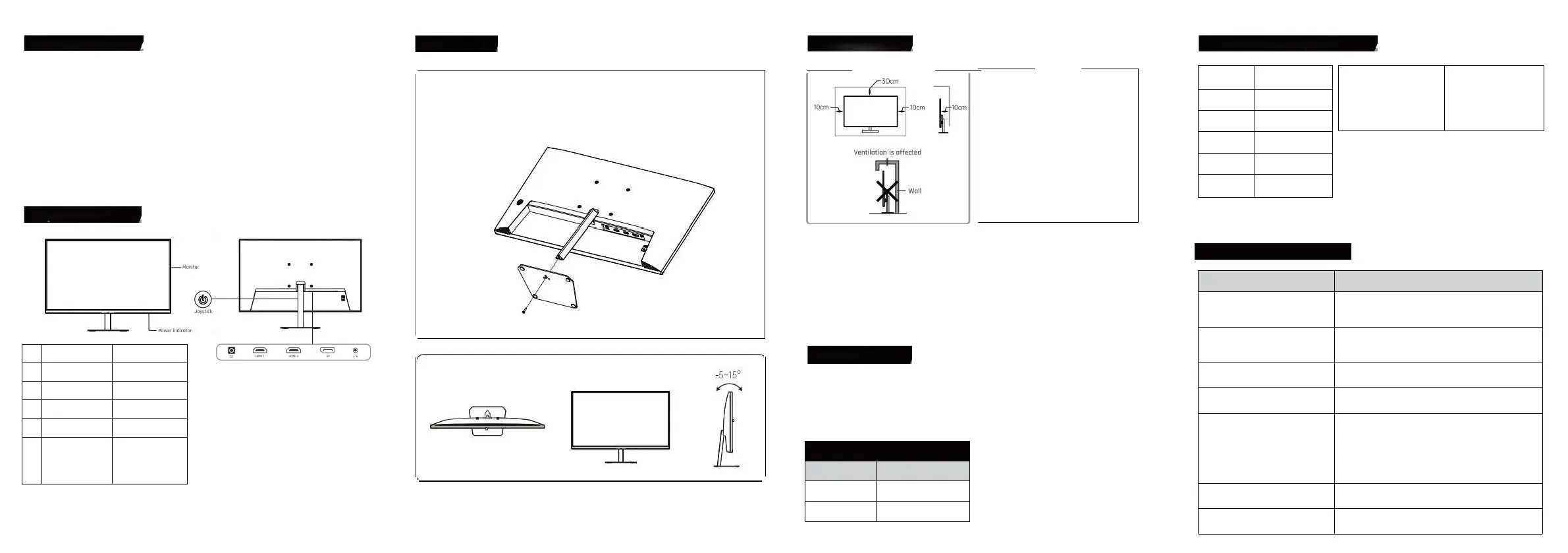
ProductIntroduction
Itisakindofhigh-performanceintelligentmultiplefrequencyscanningdisplay,whichadapts
activemotrixthinfilmtransistorLED-backlitLCD.Laffichageestcontrôléparlatechnologie
numériquedumicroordinateurMCU.Itiscompactandlightweight,whichissuitablefornarrow
workingspaces.
Beforeinstallation,pleasecheckwhichthefollowingorticlesarecompleteinthepackingbox
-LCD×1-PowerAdapter×1-Screwdriverx1
-Base×1-Cartedenvoi×1-Guidedelutilisateur×1
-SignalCablex1
Ifanyoftheaboveproductismissing,pleasecontactwithproductdistributorimmediately.
Avisspécifiqueocossoriesinordertoprevoilinkind.Peasekeppockingmateriosfuture
morement
KeysAndInterfaces
initiolShortcutKeys
EntertheFunctionMenu
EntréesourceSlgnol
MoveUp
Mid
dle
Luminance
MoveDown
shptoutKeyfo
GomingAssistance
Exitand
Retouraumenuprécédent
ShartcutKeys
0penSub-menu
ondSelectonOption
Tm00le
dscowshert-
gressing
Tumoffthedisplay
bypressingand
holdingar3seconds
Tunoffthe
disployby
pressn900d
holdingfor3seconds
PowerIndicator
Lindicateurconstantsignifiequelaffichageestuneopérationinnarmalgthefloshindicatorrepresentsnosignalstate.Under
theenergyconservationstate,hedisploywillnormalementworkifthesignalisprovided.Laffichageeststllpoweredon
thestandbystote.Thus,déplacezlecorddepuissancequandvousnelutilisezpas.
Aboutbase
·Alignthethreepositioningpassesofthesupportandthe
base,thenlockthebaseandthessupportwiththeprovided
screen
MountingLocation
Installersurlabase
InstollationBuide
-LaffichagedevraitêtreinstalléneoranACpowersocketthatconbeeosilypluggoble.
-ltestrecammendedtousesuitoblewallmountbrocketsaroboseforsafetypurpose
-Topreventinjury,thedisployshouldbeplacedonasmoothhorizantolplane,orfixedonefirmwall.
Hfyouneedtoinstallateonawallitshouldbedonebyprofessionoltechnicians.Theimproperdisployinstallationmay
causeinstobMty
-Notplacethedisplaywhereitmightbesufferedfromthemechanicol
vibration.-Notplacethedisplaywhereinsectsmayenter
-Donotplacethedisploydirectlyfocusinganaircaonditianer,ortheinternalponelmaycondense,leodingtofoults
-Donotplocethedisplaywherethereisastrongelectromagneticfield,oritwillbeinterconnectedwithanddamaged
bytheelectromagneticwaves
SafetyProtection
QuandlesignalvidéoduPCdépasselagammedefréquencedelaffichage,lesignalde
synchronisationdeligneetdechampseradisoblesignaldesynchronisationdechamppour
protégerlaffichage.Underthiscircumstance,youmustsetthe
OutputfrequencyofthePCtoanacceptablerangeforthedisploytoworkproperly.
PowerManagementSystem
Mode
PowerConsumption
NormalOperation
Standb
≤36W
y
≤0.5W
ProductTechnicalSpecifications
PanelDimenslon
BestOperatin
23.8"
g
ResolutionRotio
1920×1080@180Hz
nputVoltoge
Contra
DC12V/3A
s
1000:1(TYP)
VisibleArea
Pitchsize
forwollmou
527mm x 296mm
n
100mmx100mm
SimpleProblemsDisposal
Symptoms
DisposalMethods
1.Écranblanc/indicateursde
puissancenefonctionnentpas
Vérifieroùlapprovisionnementenpuissanceestenbon
contactaveclaffichageetlapochedepuissance;Et
vérifieroùledisployesttournéhors
Blurredtoolargeortoosmallimages
Gotothe"ImageSettings"categorymenuandselect
"ImageAutoAdjust"tomakethemonitoradjustoutomatica
llyto
correct.(0nlyavailableformonitorswithVGA)
3.Écransombre
Enterthe"Brightness&Contrast"menutoregulate
thecontrastandthebrightnessofthedisplay
4.Displayoverheating
Leaveatleast10cmofventilatedspacearoundthedisplay.
Donotplacearticlesonthedisplay
5.0ark/lightspotsquandpoweredon
Cestnormal.Parcequeladifférencedetempératureestdans
le
environment,thebacklittubeemitsunevenlightot
theinitiastageafterthedisplayturnson.Toujours,letube
deretourwillemitnormallightafter20minutes,et
thedark/lightspots
Ilseraéliminéàcemoment-là.
6.Imagedistortion,flashing,s
hacking
Checkyourcomputerconfiguration,choosetheco
rrectresolution,andresetyourrefreshrate
7.NoisySignalwhenpoweredoff
Duringthepowerofthedisplay,theremaybesome
noisysignalsonthescreencookedbythenormaldischarge
Ventilation
●Pleaseleavethespacearoundthedispl
aywiththesizeatleostshowinthefigure.
●Donotcouvrelestrousdeventilationou
insérerquelquechosedansleshell.
●Unlessthereisproperventilation
conditionsandadequateventilationspace
Aroundthepay,donotplacethedisploywithin
limitedspace,suchasabookcabinetorabuilt
-incloset.
WarkingEnvironmentRequirements
Maximumoltitude
Atmosphericpressure
Operatingtemperatureandhumidi
tyStarogettempératureand
humidity
5000m
85lpo~106kpa
0C~40C30%-90%oondesdg-20C-
55C20%=93%Nc-ondonhg
SignalCableConnection
ConnecterlesignalcobletotheHOMouOPportdesortiedesignall
e
pCpuisconnecterlautrefindusignalobletoautrecorrespondngportd
e
signalentréesurtheLCO
HeadsetConnection
Afterconnectingthehendset,theewillbeudooutput,
aonditososupporseatemalloudspeakers
RemarkAlltechnicalspedificationsintheUserGuideandon
theexternalpoclingareallowedtochangewithoutpriornotice.if
thereisosubtledifferencebetweentheUserGuideand
theoctuoloperotion,thelattershollprevail.
Product specificaties
| Merk: | KTC |
| Categorie: | Monitor |
| Model: | H24F8 |
Heb je hulp nodig?
Als je hulp nodig hebt met KTC H24F8 stel dan hieronder een vraag en andere gebruikers zullen je antwoorden
Handleiding Monitor KTC

6 Oktober 2025
29 Februari 2024
28 Februari 2024
28 Februari 2024
Handleiding Monitor
Nieuwste handleidingen voor Monitor
25 Augustus 2026
24 Augustus 2026
24 Augustus 2026
24 Augustus 2026
24 Augustus 2026
20 Augustus 2026
19 Augustus 2026
19 Augustus 2026
19 Augustus 2026
19 Augustus 2026