Keenetic Buddy 6 SE KN-4410 Handleiding
Keenetic Niet gecategoriseerd Buddy 6 SE KN-4410
Bekijk gratis de handleiding van Keenetic Buddy 6 SE KN-4410 (2 pagina’s), behorend tot de categorie Niet gecategoriseerd. Deze gids werd als nuttig beoordeeld door 19 mensen en kreeg gemiddeld 4.6 sterren uit 2 reviews. Heb je een vraag over Keenetic Buddy 6 SE KN-4410 of wil je andere gebruikers van dit product iets vragen? Stel een vraag
Pagina 1/2
2
1
10:00
Welcome to the
Initial Setup
Wizard
Run wizard
3
A
2
10:00
Mesh Wi-Fi
System
Acquire
4
1
3
B
1023
KEENETIC
BUDDY SE
Quick Start Guide
AX3000 Mesh Wi-Fi 6 Range Extender
with Gigabit Ethernet Port
Model: KN-4410
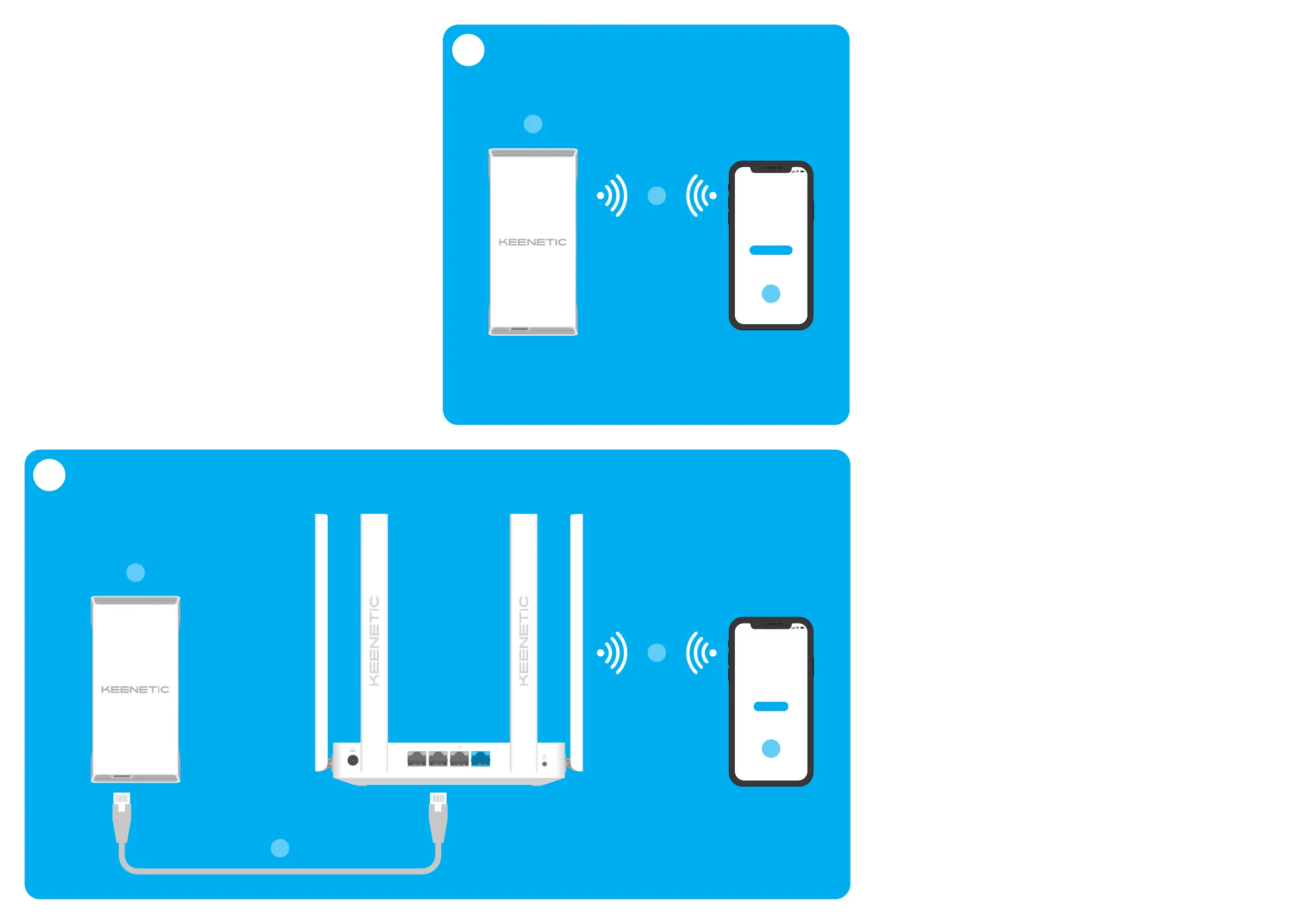
A. Extending Your Existing
Wi-FiNetwork
Ifthe existing network isrunning onaKeenetic Wi-Firouter, please follow
Scenario Bfor installation.
1 Plug your Keenetic Buddy 6SE(hereinafter ‘Range Extender’, ‘Keenetic
device’) into apower socket next toyour router. Check that the Wi-FiLED
onthe Range Extender starts blinking red.
2 Сonnect amobile device / computer toyour Range Extender via Wi-Fiusing
the default Wi-Finame (SSID): Keenetic_Extender_Setup.
3 Once connected, anInitial Setup Wizard window will appear onyour mobile
device / computer. Follow the instructions toset upyour Range Extender.
Note: Ifthe Wizard does not appear, using abrowser gotomy.keenetic.net.
Refer tothe Frequently Asked Questions section for more information.
4 Relocate the Range Extender within the range ofyour main router, about
halfway between your router and the Wi-Fidead zone toexpand your
Wi-Finetwork. The Wi-FiLED onthe Range Extender will illuminate green
when ithas good connection toyour router orblue ifthe connection isweak.
B. Extending Your Keenetic
Mesh Wi-FiSystem
1 Plug your Keenetic Wi-FiRange Extender into apower socket next toyour
Keenetic Main Router. Check that the Wi-FiLED onthe Range Extender starts
blinking red.
2 Make sure your Keenetic Main Router isactive and has anInternet connection.
Connect the Keenetic Wi-FiRange Extender toyour Keenetic Main Router using
anEthernet cable (assupplied). Alternatively you can connect the devices
wirelessly bysimultaneously pressing the Wi-FiControl Buttons onboth
devices. Check that the Wi-FiLED onthe Range Extender isblinking blue.
3 Сonnect amobile device / computer toyour Keenetic Main Router network.
4 Launch aweb browser and gotomy.keenetic.net and log intothe Main
Router orlaunch the Keenetic mobile application. Then choose the
Wi-FiSystem section and click Acquire toadd the Range Extender toyour
Wi-FiSystem. Wait for the process tocomplete.
Note: Ifthe Range Extender does not appear onthe Wi-FiSystem page, follow
the instructions for resetting the Range Extender inthe Frequently Asked
Questions section.
5 Relocate the Range Extender within the range ofyour router, about halfway
between your router and the Wi-Fidead zone toexpand your Wi-Finetwork.
The Wi-FiLED onthe Range Extender will illuminate green when ithas good
connection toyour router orblue ifthe connection isweak.
For technical support and other information,
please visit
support.keenetic.com
Product specificaties
| Merk: | Keenetic |
| Categorie: | Niet gecategoriseerd |
| Model: | Buddy 6 SE KN-4410 |
Heb je hulp nodig?
Als je hulp nodig hebt met Keenetic Buddy 6 SE KN-4410 stel dan hieronder een vraag en andere gebruikers zullen je antwoorden
Handleiding Niet gecategoriseerd Keenetic

6 December 2025
29 November 2025
27 November 2025
22 November 2025
22 November 2025
21 November 2025
Handleiding Niet gecategoriseerd
Nieuwste handleidingen voor Niet gecategoriseerd
27 Augustus 2026
27 Augustus 2026
27 Augustus 2026
27 Augustus 2026
27 Augustus 2026
27 Augustus 2026
27 Augustus 2026
27 Augustus 2026
27 Augustus 2026
27 Augustus 2026