Icon U-Solo Live Handleiding
Icon Niet gecategoriseerd U-Solo Live
Bekijk gratis de handleiding van Icon U-Solo Live (2 pagina’s), behorend tot de categorie Niet gecategoriseerd. Deze gids werd als nuttig beoordeeld door 14 mensen en kreeg gemiddeld 4.5 sterren uit 4 reviews. Heb je een vraag over Icon U-Solo Live of wil je andere gebruikers van dit product iets vragen? Stel een vraag
Pagina 1/2
ENGLISHQuick Start Guide
FRANÇAISLe présent guide d'utilisation
DEUTSCHEDie Benutzeranleitung
ITALIANOManuale di istruzioni
ESPAÑOLEste Manual de / Usuario
日本語本ユーザマニュアル
中文(繁体)快速安裝指南
中文(简体)
快速安装指南
1
1
打開包裝
打开包装
USB2.0 Cable(Type-C) x 1
QuickStart Guide
Quick Start Guide x 1
U Solo / U Solo Live Mobile Recording interface x 1
Note: U Solo / U Solo Live Mobile Recording interface in Pack
U Solo Live (White)U SoloU Solo Live(Black)
Mac
2
2
Mac
3
3
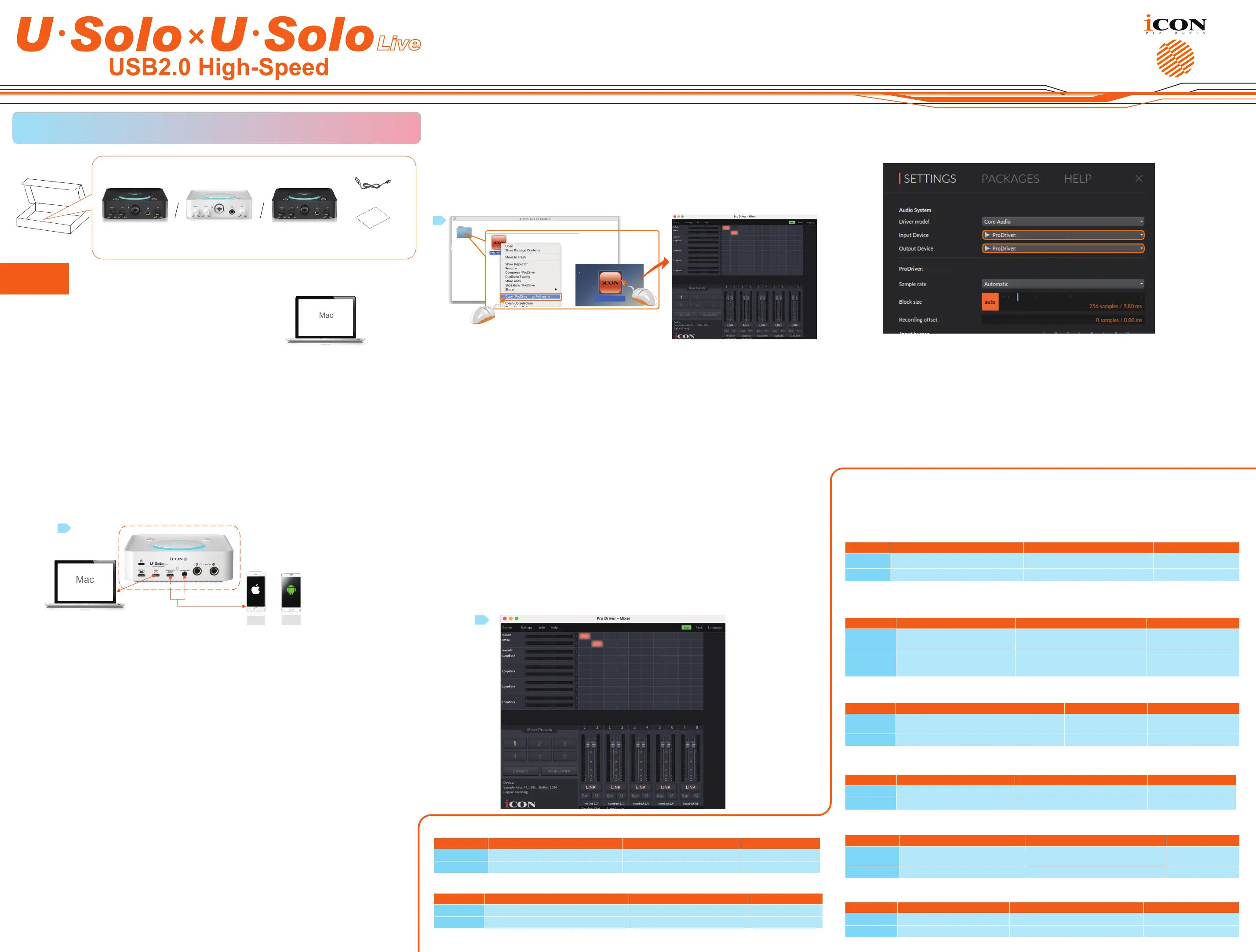
ENConnect U Solo / U Solo Live to your Mac with the USB cable provided
FRConnectez l'interface audio U Solo / U Solo Live à votre Mac à l'aide du cordon USB fourni
DESchließen Sie Ihren U Solo / U Solo Live mithilfe des mitgelieferten Kabels an Ihren Mac
ITCollegare U Solo / U Solo Live al Mac con il cavo USB fornito
ESConecte el U Solo / U Solo Live a su Mac usando el cable / USB suministrado
JA
付属の
USB
ケーブルを使用して
U Solo / U Solo Live
を
Mac
に接続する
繁中使用提供的USB數據線把U Solo / U Solo Live連接到Mac
.
简中使用提供的USB数据线把U Solo / U Solo Live连接到Mac.
1
7
USB
Esc
F1
F2
F3
F4
F5
F6
F7
F8
F9
F10
F11
F12
Prtsc
sysrq
pause
Break
Lns
Del
Home
Pgup
PgDN
End
$
~
`
!
1
··
2
3
4
5
6
7
78
9
0
)
)
*
—
-
+
=
#
¥
%
*
#
#
Q
W
E
R
T
Y
U
I
O
P
{
}
|
A
S
D
F
G
H
J
K
L
:
;
Z
X
C
V
B
N
M
<
>
?
Tab
CapsLook
Shift
Ctrl
AltAltGr
Ctrl
Backspace
[
]
|
Enter
Shift
intel
USB
Mac
or
Type-C
3.5mm
or
Type-C
3.5mm
U Solo Live
89
5
5
ENLaunch the software control panel and set up your audio settings
FRLancez le panneau de commandes du logiciel puis congurez les paramètres audio
DEStarten Sie das Software-Bedienfeld und nehmen Sie Ihre Audioeinstellungen vor
ITLanciare il pannello di controllo del software e regolare le impostazioni audio
ESEjecute el panel de control de software y congure los justes de audio
JA
ソフトウェアのコントロールパネルの起動およびオーディオ設定のセットアップ
繁中啟動軟件控制面板並設置音頻設置
简中启动软件控制面板并设置音频设置
10
2
Mac
Cube 4Nano
Cube4Nano Live
ProDrive 4
4”
4”
4”
4
U Solo Live
U Solo Live
EN
Open the “Mac” folder and copy the “ProDriver4 software control panel shortcut logo to your desktop.
Double click it to launch the software control panel.
FR
Ouvrez le répertoire « Mac » puis copiez l'icône de raccourci du panneau de commandes du logiciel
«ProDrive
4
» sur votre bureau. Eectuez un double clic dessus pour lancer le panneau de commandes du
logiciel.
DE
Önen Sie den „Mac“ Ordner und kopieren Sie das Verknüpfungslogo des „ProDrive
4
“ Software-Bedienfelds
auf Ihr Desktop. Doppelklicken Sie darauf, um das Software-Bedienfeld zu starten.
IT
Aprire la cartella “Mac” e copiare il logo del collegamento del pannello di controllo del software “ProDrive
4
”
sul desktop. Fare doppio clic per lanciare il pannello di controllo del software.
ES
Abra la carpeta “Mac” y copie el logo de acceso directo del panel de control de software “ProDrive
4
” en el
escritorio. Haga 'doble-clic' sobre este para ejecutar el panel de control de software.
JA
「Mac」フォルダを開いて「
ProDrive
4
」ソフトウェアコントロールパネルのショートカットアイコンをデスクトップにコピーし
ます。ショートカットアイコンをダブルクリックしてソフトウェアコントロールパネルを起動します。
繁中
打開“Mac”文件夾並將“ProDrive4”軟件控制面板”圖標複製到桌面上。雙擊它可啟動軟件控制面板。
简中
打开“Mac”文件夹并将“ProDrive4”软件控制面板”图标复制到桌面上。双击它可启动软件控制面板。
4
4
6
6
ENSet up your “Hardware Inputs” and “Software Outputs”
FRConguration du « Entrées matérielles » et du « Sorties logicielles »
DEEinstellungen für den „Hardware Eingänge“ und „Softwareausgänge“
ITImpostazione di “Ingressi hardware” e “uscite software”
ESCongure su “Entradas de hardware” y “Salidas del software”
JA
「ハードウェア入力」および「ソフトウェア出力」のセットアップ
繁中設置硬件軟件的輸入輸出。
简中设置硬件软件的输入输出
3
VH4 VST
11
U Solo Live
U Solo Live
ENSet up your DAW audio settings
FRConguration des paramètres audio DAW
DEDAW Audioeinstellungen vornehmen
ITRegolazione delle impostazioni audio DAW
ESCongure las opciones de audio DAW
JA
DAWオーディオ設定のセットアップ
繁中設置您的DAW音頻設置
简中设置您的DAW音频设置
EN
Open your DAW, set up the audio settings and select “ICON_U Solo / U Solo Live ” as your audio input and
output device.
FR
Ouvrez votre DAW, congurez les paramètres audio puis dénissez « ICON_U Solo / U Solo Live» comme
périphérique d'entrée et de sortie audio.
DE
Önen Sie Ihre DAW, nehmen Sie die Audioeinstellungen vor und wählen Sie „ ICON_U Solo / U Solo Live“ als
Ihr Audioeingangs- und Audioausgangsgerät.
IT
Aprire DAW, regolare le impostazioni audio quindi selezionare “ ICON_U Solo / U Solo Live ” come dispositivo
di ingresso e / Uscita audio.
ES
Abra su DAW (Estación de trabajo de Audio Digital), congure las opciones de audio y seleccione “ICON_U
Solo / U Solo Live ” como su entrada de audio y como dispositivo de salida.
JA
DAWを開き、オーディオ設定をセットアップしてから、オーディオ入力および出力用デバイスとして「
U Solo / U Solo Live
」を
選択します。
繁中
打開DAW,設置音頻設置,然後選擇“ICON_U Solo / U Solo Live”作為音頻輸入和輸出設備。
简中
打开DAW,设置音频设置,然后选择“ICON_U Solo / U Solo Live”作为音频输入和输出设备。
U Solo Live
U Solo Live
U Solo Live
7
7
ENConnect external hardware
FRRaccordement d'un périphérique externe
DEAnschluss externer Hardware
ITCollegamento hardware esterno
ESConecte el hardware externo
JA
外部ハードウェアの接続
繁中連接外部硬件。
简中连接外部硬件
EN
Connect your input devices such as microphones and guitars to the input connectors of
U Solo / U Solo Live; monitors, speakers and headphones to the output connectors accordingly.
ModelsInputsOutputsHeadphones
U Solo Live1Mics / Guitar, stereo mobile phone ins2 Line Outs, stereo mobile phone Outs1 x stereo headphone
U Solo 1 Mic in / 1 Guitar in2 x Line outs 1 x stereo headphone
IT
Collegare i dispositivi di ingresso, quali microfoni e chitarre, agli spinotti di ingresso di U Solo / U Solo Live ,
mentre i monitor, diusori e cue vanno collegati agli spinotti di uscita in modo corretto.
ModelliIngressiUsciteCue
U Solo Live
1 x Mic / stereo mobile phone
Chitarra
Keluaran 2 kabel, keluaran telepon
stereo
1 x cue stereo
U Solo1 Mic in / 1 Chitarra in2 x Line out 1 x cue stereo
FR
Connectez vos périphériques d'entrée tels qu'un microphone ou une guitare aux connecteurs d'entrée
de l'interface audio U Solo / U Solo Live ; raccordez les moniteurs, haut-parleurs et casques d'écoute aux
connecteurs de sortie respectifs.
ModèlesConnecteurs d'entrée Connecteurs de sortieCasque d'écoute
U Solo Live
1 connecteurs Microphone /
guitare téléphone portable stéréo
Sortie de 2 lignes, sortie de téléphonie
mobile stéréophonique
1 connecteur stéréo
pour écouteurs
U Solo
1 connecteur d'entrée pour
microphone / 1 connecteur
d'entrée pour guitare
2 connecteurs de sortie Ligne
1 connecteur stéréo
pour écouteurs
ES
Conecte sus dispositivos de entrada como micrófonos y guitarras en los conectores de entrada del U
Solo / U Solo Live ; monitores, altavoces y auriculares a los correspondientes conectores de salida.
ModelosEntradasSalidasAuriculares
U Solo Live
1 entradas Mic / Guitarra de teléfono móvil
estéreo
2 linea di uscita, stereo1 auriculares estéreo
U Solo1 entrada Mic / 1 entrada Guitarra2 salidas 'Line' 1 auriculares estéreo
DE
Schließen Sie Ihre Eingangsgeräte, z.B. Mikrofone / Und Gitarren an die Eingangs- Konnektoren des U Solo /
U Solo Live ; Monitore, Lautsprecher und Kopfhörer entsprechend an die Ausgangs-Konnektoren.
ModelleEingängeAusgängeKopfhörer
U Solo Live1 x Mic / Stereo-Handy-GitarreLinie 2 in stereo, ausgabe für handys1 x Stereo Kopfhörer
U Solo1 Mic In / 1 Gitarre In2 x Line Out 1 x Stereo Kopfhörer
繁中
把麥克風和吉他等輸入設備連接到U Solo / U Solo Live的輸入接口;相應地把監聽器、音響和耳機連接到輸出接口
類型
輸入 輸出耳機
U Solo Live
1 X 麥克風/吉他,立體聲智能手機輸入 2 X 線性輸出,立體聲智能手機輸出1 X 立體聲耳機
U Solo
1 麥克風輸入 / 1 吉他輸入2 x 線性輸出 1 X 立體聲耳機
简中
把麦克风和吉他等输入设备连接到U Solo / U Solo Live的输入接口;相应地把监听器、音响和耳机连接到输出接口
类型输入输出耳机
U Solo Live
1 X 麦克风/吉他,立体声智能手机输入 2 X 线性输出,立体声智能手机输出1 x立体声耳机
U Solo
1 麦克风输入 / 1 吉他输入2 x 线性输出 1 x立体声耳机
JA
マイクやギターなどの入力デバイスを
U Solo / U Solo Live
の入力コネクターに接続し、モニター、スピーカー、およびヘッドフォ
ンを出力接続に適宜に接続します。
モデル入力出力ヘッドフォン
U Solo Live
1 Mic /ギター入力2ライン出力、ステレオ携帯電話出力ステレオヘッドフォン x 1
U Solo
Mic 入力 x 1 /ギター入力 x 1ライン出力 x 2ステレオヘッドフォン x 1
ENTurn on your Mac
FRAllumer votre Mac
DEMac einschalten
ITAccendere il Mac
ESEncender la Mac
JA
コンピューターの電源を入れます
繁中打開你的Mac
简中打开你的Mac
ENUnbox
FRDéballer
DEÖnen Sie die Verpackung
ITAprire la confezione
ESAbrir el embalaje
JA
パッケージを開く
繁中打開包裝
简中打开包装
ENDownload and install ProDriver for your Dyna Series Audio Interface. Please note that Mac computers
are 'plug and play' - there is no need to download additional drivers. ProDriver is optional, feature-
rich software.
FRTéléchargez et installez prodriver pour les interfaces audio de la gamme Dyna. Notez que les
ordinateurs Mac sont "Plug and play" et qu'il n'est pas nécessaire de télécharger des pilotes
supplémentaires. Prodriver est un logiciel optionnel riche en fonctionnalités.
DELaden Sie ProDriver für Ihr Dyna Series Audio Interface herunter und installieren Sie es. Bitte
beachten Sie, dass Mac-Computer "Plug and Play" sind – es ist nicht erforderlich, zusätzliche Treiber
herunterzuladen. ProDriver ist eine optionale, funktionsreiche Software.
ITScaricare e installare ProDriver per l'interfaccia audio Dyna Series. Si prega di notare che i computer
Mac sono 'plug and play' - non è necessario scaricare driver aggiuntivi. ProDriver è un software
opzionale ricco di funzionalità.
ESDescargar e instalar prodriver para la interfaz de audio de la serie dyna. Tenga en cuenta que el
ordenador Mac es "plug - and - play" y no necesita descargar otros conductores. Prodriver es un
software opcional y rico en funciones.
JA
Dynaシリーズのオーディオインタフェースに適したProDriverをダウンロードしてインストールし
ます。Macパソコンは「プラグアンドプレイ」で、他のドライバをダウンロードする必要はありません。
ProDriverはオプションの機能が豊富なソフトウェアです。
繁中下載並安裝對應你的Dyna系列聲卡的ProDriver軟件,聲卡在Mac上是隨插即用的,無需安裝音訊
驅動程序。
简中下载并安装对应你的 Dyna系列声卡的ProDriver软件,声卡在Mac上是即插即用的,无需安装音频
驱动程序。
Product specificaties
| Merk: | Icon |
| Categorie: | Niet gecategoriseerd |
| Model: | U-Solo Live |
Heb je hulp nodig?
Als je hulp nodig hebt met Icon U-Solo Live stel dan hieronder een vraag en andere gebruikers zullen je antwoorden
Handleiding Niet gecategoriseerd Icon

21 Mei 2026
13 Mei 2026
12 Mei 2026
11 Mei 2026
7 Mei 2026
6 Mei 2026
5 Mei 2026
7 April 2026
7 April 2026
6 April 2026
Handleiding Niet gecategoriseerd
Nieuwste handleidingen voor Niet gecategoriseerd
6 September 2026
6 September 2026
6 September 2026
6 September 2026
5 September 2026
5 September 2026
5 September 2026
5 September 2026
5 September 2026
5 September 2026